
Article
Receptionist Crm Integration: Integrating AI Receptionists With Your
By Raid Contractor Marketing · · 4 min read
Integration requires connecting Raid Contractor Marketing's 24/7 AI receptionist to your CRM via API or native connectors like Zapier, syncing caller data, appointment bookings, and lead details automatically, ensuring every call updates contact records instantly so home-services contractors never lose a potential job.
Integration works through API connections linking AI voice platforms directly to CRM systems like HubSpot, Zoho, GoHighLevel, and Salesforce. Raid Contractor Marketing's 24/7 AI receptionist logs every call, qualifies leads, and syncs customer data automatically into existing contractor CRMs, eliminating manual entry and ensuring dispatch teams see booked jobs the moment calls end.
What does receptionist CRM integration actually do?
Receptionist CRM integration connects an AI-powered virtual assistant to a business phone system, scheduling tools, CRM, and other essential platforms. The AI receptionist answers calls, captures details, and writes that information directly into the CRM without human involvement.
How does the data flow between systems?
The integration streamlines customer interactions and centralises customer data. This reduces missed opportunities and improves consistency across every touchpoint. A caller provides their name, service need, and preferred time. The AI receptionist logs that data into the CRM instantly.
What separates a basic connection from a reliable one?
Not all integrations perform the same way. The gap between a basic webhook and a production-grade sync determines whether the system saves hours each week or creates new problems. A webhook might drop data during a spike in calls. A production-grade sync handles high volume without failure.
Raid Contractor Marketing builds 24/7 AI receptionists specifically for HVAC, roofing, plumbing, and electrical contractors. Every inbound call gets answered, qualified, and routed to the right place in the CRM.
Call to CRM integration happens in real time. The moment a call ends, the record appears in the system. No manual entry, no sticky notes, no lost leads.
CRM sync calls keep the database current without staff effort. Old leads get updated. New contacts appear automatically. The team works from accurate data every time they open the CRM.
How do you set up CRM for receptionist calls?
Setting up a CRM setup for receptionist calls requires connecting the AI receptionist to the existing CRM platform through available APIs, vendor connectors, and configurable options. This process ensures the two systems can exchange data and work together reliably.
APIs enable programmatic data exchange, event notifications, and control between the AI receptionist and CRM or telephony platforms. A call to CRM integration typically starts with identifying which API endpoints the CRM exposes for creating, updating, or retrieving contact records. The AI receptionist then sends call data, such as caller ID, call duration, and conversation notes, directly into the CRM fields.
What steps are involved in the setup?
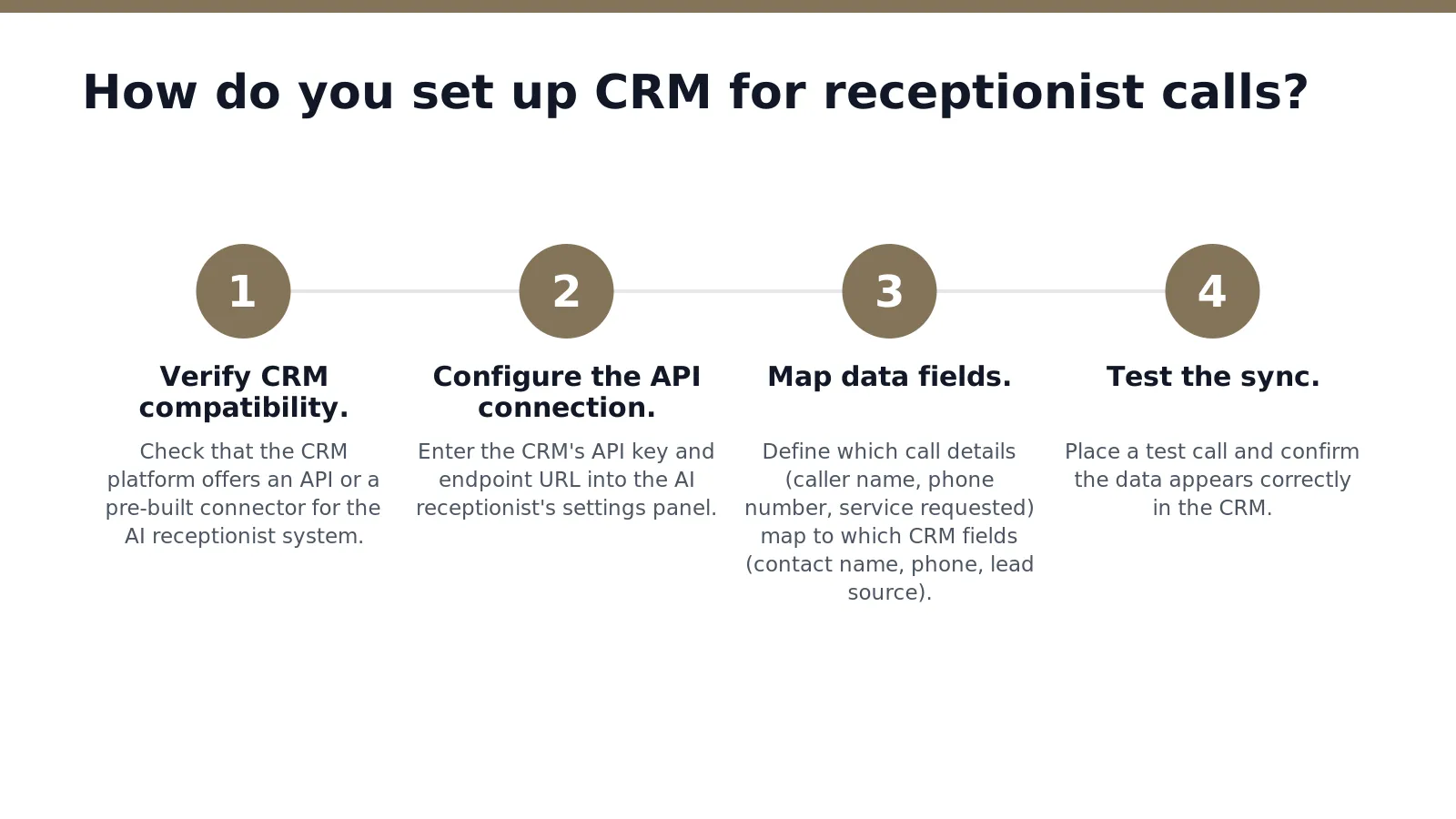
- Verify CRM compatibility. Check that the CRM platform offers an API or a pre-built connector for the AI receptionist system.
- Configure the API connection. Enter the CRM's API key and endpoint URL into the AI receptionist's settings panel.
- Map data fields. Define which call details (caller name, phone number, service requested) map to which CRM fields (contact name, phone, lead source).
- Test the sync. Place a test call and confirm the data appears correctly in the CRM.
Vendors commonly offer pre-built connectors for mainstream CRM platforms to speed deployment and reduce engineering effort. This approach eliminates the need for custom code on most setups.
How does lead routing work after setup?
Lead routing to CRM happens automatically once the CRM sync calls feature is active. When the AI receptionist qualifies a caller as a lead, the system creates a new CRM record and assigns it to the appropriate team member or pipeline stage. The entire transfer occurs in seconds, without manual data entry.
Raid Contractor Marketing's approach embodies professionalism, transparency, and focus, catering specifically to the unique needs of home-services contractors during setup. The goal is a system that captures every lead and routes it correctly, every time.
What steps route leads and sync calls to your CRM?
A receptionist crm integration follows a clear sequence of steps that captures every inbound call. Writes the data directly into the business's existing system. The process starts with the AI receptionist answering the call, then uses the CRM's API to look up the caller's record in real time. This call to crm integration happens within seconds of the first ring.
How does the AI receptionist access customer data during a call?
The AI receptionist connects to the CRM through an API. This connection allows the system to retrieve purchase history and past inquiries instantly. A caller does not need to repeat information the business already holds. The AI uses that data to personalize the conversation, which builds trust and speeds up resolution.
What happens after the call ends?
After the conversation, the system performs a crm sync calls operation. The AI writes a complete record of the interaction back into the CRM. This includes the outcome of the call, any new lead details, and the next action required. Lead routing to crm then directs the record to the correct team member or workflow based on configurable rules.
Raid Contractor Marketing configures these workflows, routing rules, and templates to match each contractor's processes. The result is a system where every call is answered, every lead is handled, and no data falls through the cracks.
Conclusion
In closing, integrating your AI receptionist with your CRM transforms how your contracting business captures and nurtures leads around the clock. When these systems work together seamlessly, every customer inquiry flows directly into your workflow, eliminating missed opportunities and manual data entry. For home-services contractors juggling multiple jobs. Tight schedules, this integration means your team focuses on what matters most, delivering exceptional service, while your AI handles the front-line communication that keeps leads moving forward.